

Description of Business Environment
In the cellular industry, customers have a propensity to churn (i.e., discontinue their subscription with one cellular carrier and switch to another cellular carrier). When a customer does not receive the type of service expected or another cellular carrier offers cheaper products or services, then a possibility exists of losing the customer. Effective approaches for retaining current customers and acquiring new customers must be implemented for a cellular carrier to increase both market share and revenue.
As part of a cellular carrier’s sales and retention programs, retail sales associates may be required to call or contact existing customers after a sale on a periodic basis. The intent is to provide the customer with a different experience from other wireless carriers. The purpose of this sales follow-up enhancement was to facilitate consistent follow-up calls with customers and prospects by providing retail sales associates with a web enabled application to access a central contact database. The application was to remind retail sales personnel of the need to contact customers after a sale on the fifth day, 30th day, fifth month, 11th month and one month prior to the contract end date. In addition, the software application should remind a retail sales associate of the need to follow up with calls to prospects for future sales. New customers can be acquired with follow-up interactions using a record of leads that are updated with contact history information. 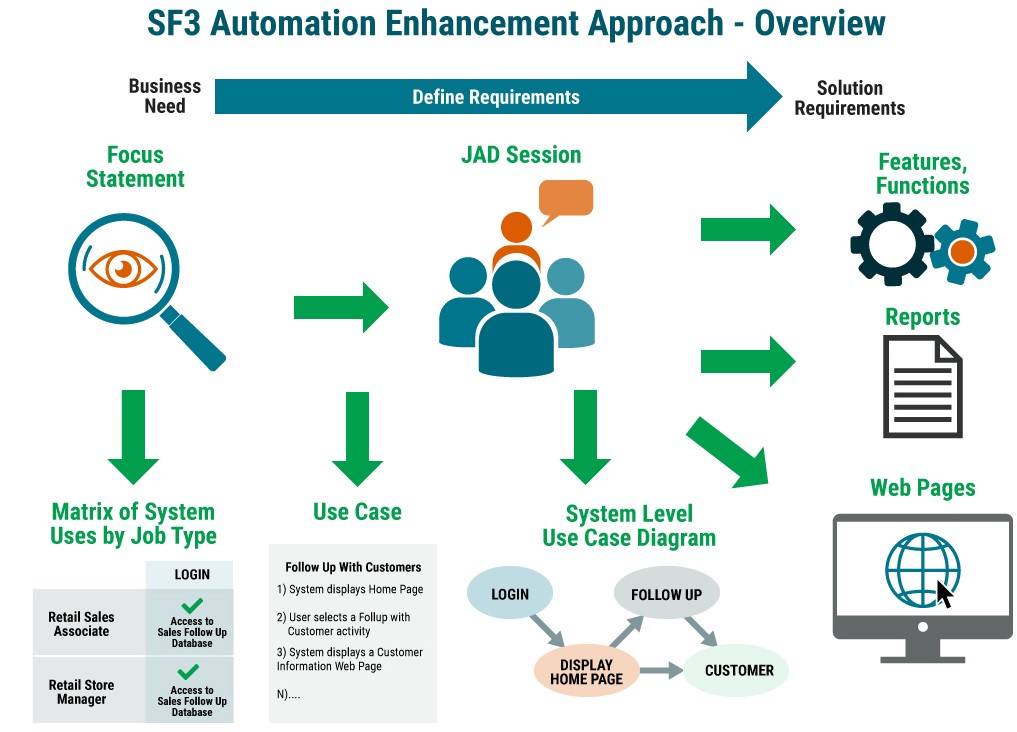
Requirements Approach
A basic belief that we incorporated into this application development process was that business users are at the centre of the process—their input and feedback were essential to define the use cases and solution requirements. The Joint Application Development (JAD) session was the basic technique for eliciting, specifying, and refining the solution requirements. The JAD sessions involved the entire project team, which was composed of the following individual roles: business user, system architect, developer, tester, project manager, and requirements analyst. Even though we were defining requirements for a computer system, our approach was based on a thorough understanding of the business problem, business objectives, user job types, and user tasks to complete business activities.
As a basis of establishing agreement on the product scope and business perspectives of the sales follow-up enhancement, a focus statement2 was used. The focus statement is a technique to define the project boundaries or scope, the point of view that determines what aspects of the world are relevant, the amount of detail required to define the requirements, the geographical and organizational considerations, and the scope of integration with other applications.
Focus Statement
Scope (project boundaries)
To establish a nationwide repository of customers, leads, and the associated history of contacts, enabling the entire company sales force to share and access this information.
Includes
- Assignment and tracking of customer contact-related tasks
- Ability to track leads (i.e., prospects)
- Ability to conduct follow-ups with existing customers after sale
- Ability to classify system users by role and responsibilities (which then determines access level privileges)
- A standard set of reports across the sales and marketing channels
- A web-enabled application (intranet)
- System availability on intranet is 24/7
- Ability to support 2,500 total users and 300 concurrent users
Perspective (stakeholders)
- Sales
- Marketing
- Business user roles:
- Retail sales associate
- Retail store manager
- General manager
Detail (amount and precision)
Detail will be needed to specify the following requirement types to support design, development, and testing for a software application:- Use cases
- Features and functions
- Web pages
- Reports
- System interfaces
- Databases and files
- Performance
- Conversions
Scope of integration (other projects or applications impacted)
Customer Management Information System
After discussing the business problem and existing business situation, we elicited information about the different types of jobs and the hierarchical structure of job types for retail sales. The next step was to identify the business tasks that were performed by those job types to accomplish business goals.The retail sales associate performed most tasks that involved interactions with customers and prospects. General manager personnel use reports to manage the people and the business (e.g., compliance with strategic direction, sales performance, prospect contacts). The sequence of steps in the JAD session to elicit job types and tasks and then define use cases consisted of the following:
- Identify job types and hierarchical structure in the organization
- Brainstorm the user tasks
- Determine which tasks are included in the project scope
- Consolidate to eliminate redundant or unnecessary tasks
- Prioritize the user tasks to determine the most important
- Develop use cases for the important user tasks
After an initial set of use cases were elicited from the users based on the business tasks performed by the different job types, the system architect and requirements analyst constructed a high-level use case diagram in an offline work session. It contained the set of use cases elicited during the initial JAD session, the job types or actors from the job type hierarchy, and additional use cases such as Login and Calendar, which were identified using previous knowledge of software applications. This diagram was used as a starting point for a business user to construct a matrix of system uses by job type that identified the system functions and access privileges for the different job types with respect to use cases and reports. 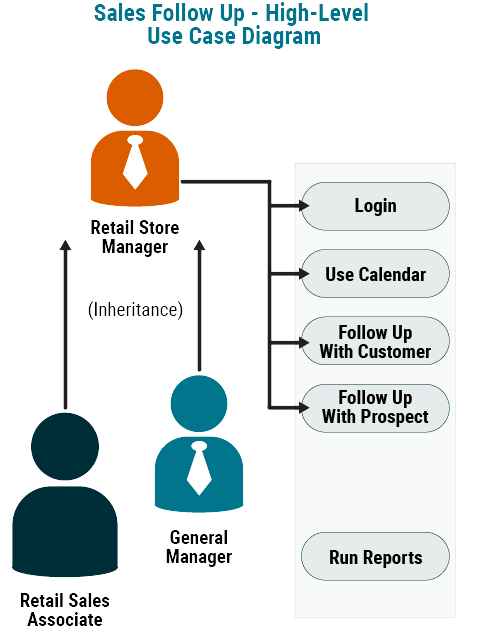
Matrix of System Uses by Job Type
| X Normal access, ability to complete activities Y Access, ability to perform update activity Z "Read only" access, no updates |
Login | Calendar | Follow-Up w/ Customer | Follow-Up w/ Prospect | Run Reports |
| Retail Sales Associate (RSA) | X Access to follow-up application. |
X Use of calendar to identify their activities for a specific date. |
X Ability to identify a specific activity as completed. Includes all points of contact. |
X Access to prospect info entered into database. Includes ability to add and delete. |
N/A |
| Retail Store Manager | X Access to follow-up application. |
X Use of calendar to identify RSA activities for a specific date. |
Y Ability to view RSA’s follow-up activities. Ability to cancel activities, not delete. |
Y Ability to view RSA’s prospects. Includes ability to add and delete. |
X Ability to run reports for RSAs at store location. |
| General Manager | X Access to follow-up application. |
X Access to follow-up application. |
Z “View only” access for all RSAs in area. |
Z “View only” access for all RSAs in area. |
X Ability to run reports for all stores in area. |
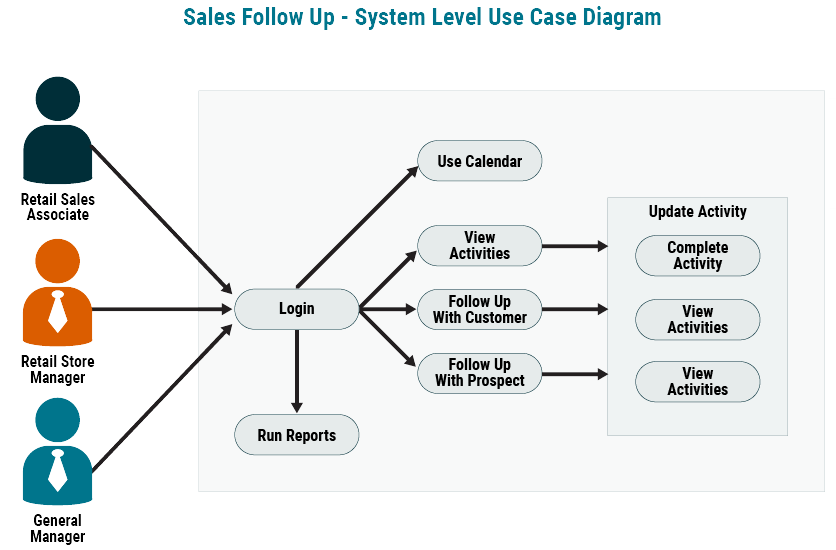
The use case was the primary technique for identifying the users’ interaction with the solution and formed the basis for documenting the steps a user performs to accomplish a business task or respond to a business event. As we performed walkthroughs of the user/system interaction with the initial use cases, we were able to specify different web page prototypes and identify additional use cases. By analyzing the steps performed and web page prototypes accessed in a task, we gained insight as to how the user navigates between use cases and web pages in a task. The insights gained allowed us to construct a system level use case diagram that was continually revised during the process.
Navigating a use case path means to start with a user activating the sales follow-up application, then identify each step that the user performs until a business task is completed. During this process, each step that the user performs and each response by the system to a user action is documented. The user is viewing both a UI prototype, either a paper or electronic prototype (whichever is used in your environment) of the web pages and the system level use case diagram as the use case path is being navigated. As the interaction between use cases and the UI prototype of web pages occurs, the user interface elements are documented, and solution requirements are identified.
For example, the web page layouts are updated based on the actions performed or the data entered by a user, as well as the data displayed by the system in response to a user action. The requirements analyst should document each use case path that is traversed as the group navigates the system level use case diagram.
As a result of the use case navigations and web page refinements, we were able to develop a sample web page layout for the home page so that business and technical stakeholders could verify that the main system functionality was identified.
The process to navigate the use case paths consisted of the below activities.
Identify a job type from the matrix of system uses by job type:
- Select a business task that the user must perform while interacting with the application
- Start with a user activating the sales follow-up application and asking the question “What do you want to happen?”
- Identify and document each step that the user performs and the corresponding system response to the user action
- Document the action(s) that a user may perform while interacting with the system via a web page and document the data entered by the user or the data displayed by the system in response to a user action
- Utilize the system level use case diagram and the UI prototype of web pages as the instruments for navigating the use case paths
- Continue asking the question “What happens next?” The users will focus on the web pages and, using their knowledge of the business task, will provide feedback about web page actions and data entered by the user or data displayed by the system. Inherent in the process is a flow between the different web pages traversed by the user to accomplish the business task. The facilitator notes the path taken on the system level use case diagram along with any changes based on the user’s feedback.
- A use case path is completed when the user indicates that the business goal has been achieved for the business task
Findings and Observations
Navigating a scenario through a combination of use cases by a specific job type to accomplish a business task was a very effective method to elicit solution requirements (i.e., features and functions) and define the user interface (i.e., web pages and web page layouts required to support the tasks that a user must perform to accomplish a business goal or respond to a business event).
While the use case technique may not be applicable to all solution enhancements, it was used effectively in the example above to define solution requirements for a new application with a web interface. The use case allows users to identify what functionality is needed by the solution to support their business needs. Each solution enhancement should be assessed individually to determine if use cases are beneficial in the elicitation phase. For example, if the features and functions are already defined, then a use case approach may not be needed (a requirements decomposition can be built that transitions easily into user stories).
In the example, use cases did not provide significant benefit in defining reports. Users identify types of reports and report layouts based on information needs in the business. To define requirements with use cases, a project schedule template is needed that supports an iterative process. It takes time to traverse use case paths to understand and document a user’s needs to complete a business task.
Defining use cases is an iterative approach. It may require more meetings and interactions with users than other traditional requirements gathering approaches. 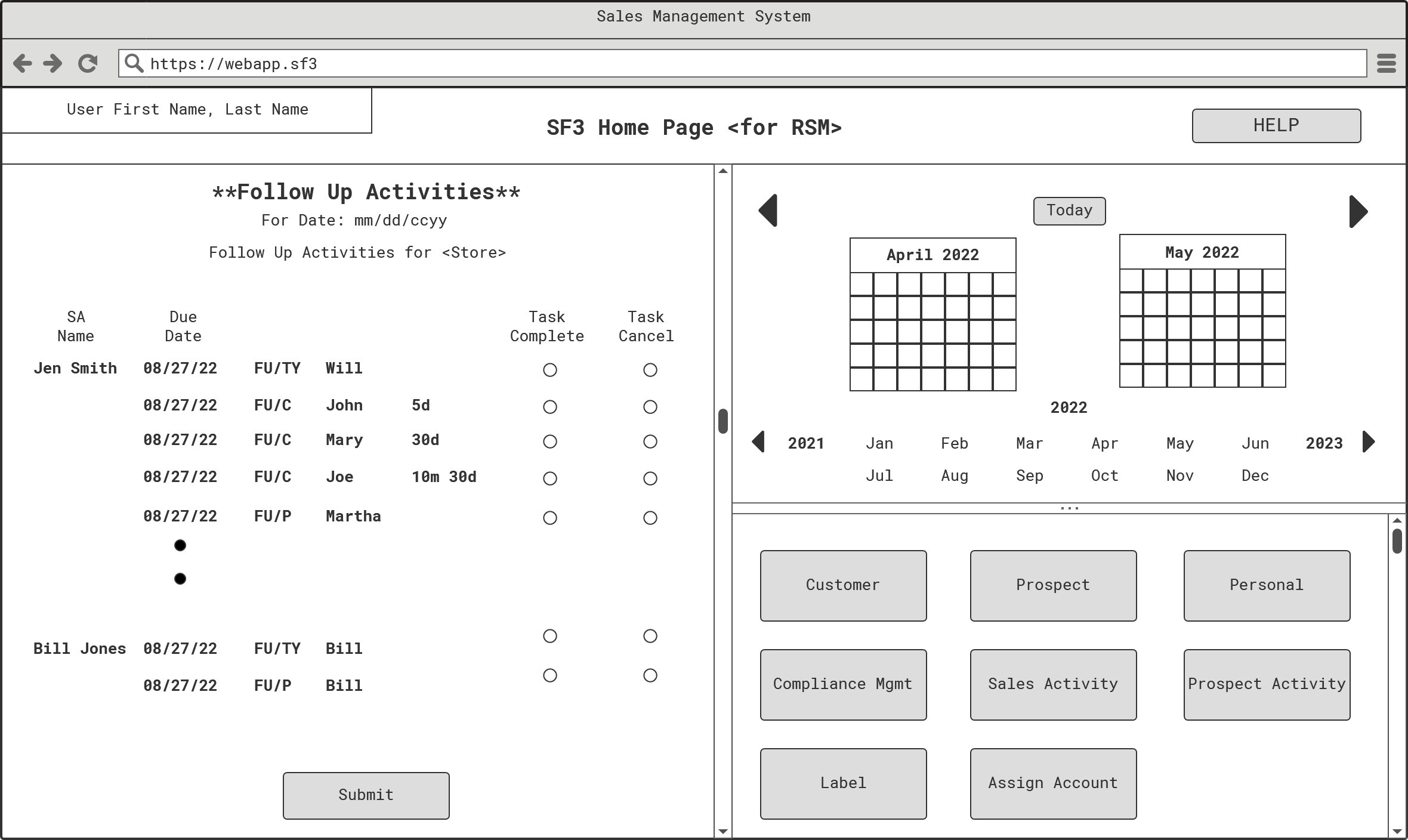
Conclusion
In the beginning of the requirements gathering activities, we did not plan to utilize the use case as the primary technique for eliciting the solution requirements. As we progressed with requirements gathering, we found that use cases can be understood by business users and utilized to define the steps of a task that users must perform in the operation of their business.
Navigating use case paths helps identify, document, and validate the steps that a job type performs in the use of a computer system to accomplish a participation in use case development is beneficial for them to accept and support the software solution that is being developed and delivered. Since business users relate to the tasks they perform in their day-to-day business operation, they can become easily involved in the process to develop use cases. The use case approach provided an effective framework for eliciting solution requirements and defining a web page user interface with features and functions.
References
- Schneider, G. and Winters, J.P. Applying Use Cases: A Practical Guide. Reading: Addison Wesley Longman, Inc, 1998.
- Branton, R. “Focus statement template.” Instruments Release 1.6. Atlanta: Advanced Strategies, 1995.

About the Author
William (Alex) Steed Jr. is an IT Business Systems Analyst at Southern Company Services, Inc. where he develops requirements for customer service and marketing projects and performs product owner responsibilities on agile projects. Alex has worked on software development projects at IBM, Cingular Wireless, GTE Wireless, S.P. Richards, and Solv Corporation. Alex has been a practitioner on waterfall and agile methodology IT projects in individual contributor and leadership roles and has led highly complex full lifecycle enterprise-level projects.


